Sites
In Stokkd, a "site" is any place where you track stock quantities separately. Learn what counts as a site, how sites relate to your subscription licences, and how sites are set up depending on your integration type.
Overview
A site is any location where you track stock quantities separately in Stokkd. Each site is counted independently in a stocktake — it has its own stock data, its own areas, and its own results.
 The term site is the label shown throughout Stokkd. In some technical or API contexts you may also see the word location — they refer to the same thing.
One Building, Multiple Sites
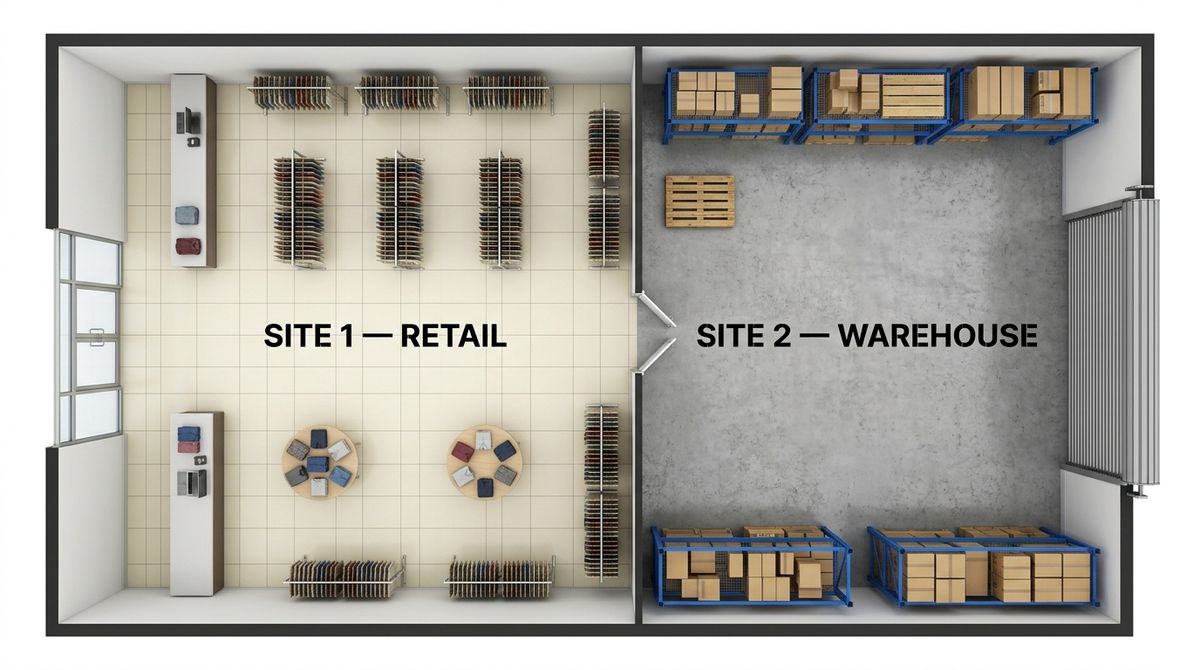
A site does not have to be an entire building. A single physical premises can contain multiple sites if different areas hold stock that are tracked separately.
Example: A retail business in one building might have two sites:
- Site 1 — Shop Floor: Stock on display, available for sale
- Site 2 — Warehouse: Stock in storage awaiting transfer to the shop floor
Because the shop floor and stock room hold different quantities of the same products, each needs to be counted independently — and each is therefore a separate site in Stokkd.
Common reasons a business has multiple sites within one premises:
- Different physical areas with genuinely different stock levels (shop floor vs. back-of-house storage)
- Separate departments tracked independently for reporting
- Franchise locations sharing a building but operating their own inventory
Sites and Licences
Each active site requires one licence slot. Licence slots are included in your Stokkd subscription — the number of slots you have purchased determines how many active sites you can run simultaneously.
- Active sites (status: paid/active) consume a licence slot and can run stocktakes
- Inactive sites do not consume a licence slot but cannot be used until reactivated
If your business opens a new location or expands, you will need to add a licence slot to your subscription before activating the new site.
How Sites Appear in Stokkd
Your sites already exist in your business before you use Stokkd. Stokkd adapts to your existing setup — it does not define your site structure for you. How your existing sites are brought into Stokkd depends on your integration type:
API / Connected Integration (e.g. Shopify)
Sites are automatically synced from your connected point-of-sale or inventory system. When you connect Shopify, all of your Shopify locations are pulled in as sites in Stokkd — you do not need to create them manually.
Once the integration sets certain site fields (such as the site name and external identifier), those fields become locked — they are controlled by the connected system and cannot be freely edited inside Stokkd.
File-Based Integration (Manual or Template, e.g. Rex, MYOB)
Sites are created manually by your company administrator to reflect your existing real-world locations. All site fields remain fully editable at any time because there is no connected system controlling them.
The Short Code Field
Regardless of integration type, Stokkd adds one field of its own: a short code. This is a brief abbreviation for the site (for example, SYD-SHOP or WH1) that is shown in place of the full site name on screens where space is limited. Your administrator can set or update the short code at any time.
Best Practices
- Set a meaningful short code for each site — keep it brief and recognisable so counters can identify the site at a glance on space-limited screens.
- Review inactive sites periodically. Deactivate sites that are no longer in use to free up licence slots for new locations.